

Review Process#
This page walks through the process of leading a package review for pyOpenSci.
Editor checklist: Get Started With Leading a Package Review#
Follow the checklist below when serving as an editor for a package submitted to pyOpenSci for review.
All reviews happen in GitHub issues. The template for the
yaml header of a review submission below will be
referenced multiple times in the steps below:
---
name: Submit Software for Review
about: Use to submit your Python package for pyOpenSci peer review
title: ''
labels: 1/editor-checks, New Submission!
assignees: ''
---
Submitting Author: Name (@github_handle)
All current maintainers: (@github_handle1, @github_handle2)
Package Name: Package name here
One-Line Description of Package: Description here
Repository Link:
Version submitted:
Editor: TBD
Reviewer 1: TBD
Reviewer 2: TBD
Archive: TBD
Version accepted: TBD
Date accepted (month/day/year): TBD
---
✔️ 1. First, tag the submission issue on GitHub & assign yourself to the issue#
Once you begin the review process as an editor:
Tag the submitted GitHub issue with the
1/editor-checkstag if it hasn’t already been tagged by the editor-in-chief.Make sure that you are assigned to the issue on GitHub (ie, your name is on the right-hand side of the issue as the person running it).
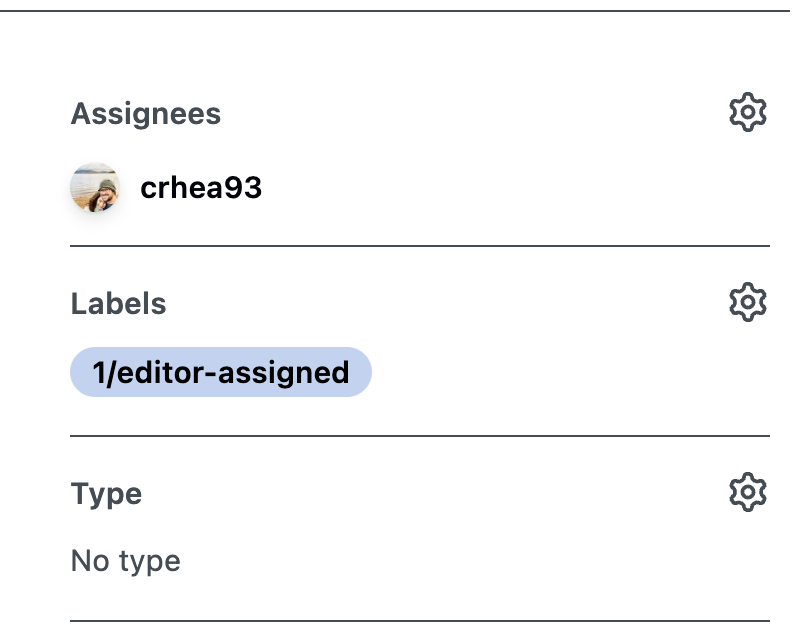
Make sure that your name is both listed in the YAML at the top of the issue and also that you are assigned to the issue on GitHub (on the right-hand side of the issue).#
Check the YAML template at top of the submitted GitHub issue, make sure that mandatory parts of the template are filled out.
If elements are incomplete, direct the authors toward filling in any missing pieces.
Submitting Author: SUBMITTING AUTHOR NAME HERE (Name @github_handle)
All current maintainers: ALL CURRENT MAINTAINERS LISTED HERE (Name @github_handle1, Name @github_handle2)
Package Name: PACKAGE-NAME-HERE
One-Line Description of Package: DESCRIPTION OF THE PACKAGE HERE
Repository Link: REPO-LINK
Version submitted: VERSION-SUBMITTED
Editor in Chief checks for structure & scope should be completed first
The editor in chief who initially engaged with this review should have already evaluated the package-level Editor Checks section for Fit, Automated Tests, Documentation, License, and Repository.
They also should have checked whether the package is in scope for pyOpenSci. And whether there is functionality overlap with functionality of any other existing Python packages.
However, in some instances, the editor-in-chief may request that an editor perform these tasks. Be sure to check the issue to ensure the above checks have been implemented before initiating the review.
If the package does not fit the pyOpenSci scope and policies and needs to be rejected, see this section in the editor-in-chief guide about how to respond.
✔️ 2. Respond to the submitter in the GitHub issue#
Once the above is complete, you are ready to add an editor response to the issue. This step ensures that the package is ready to be reviewed. It also ensures that we are using our volunteer reviewer time effectively.
Add a comment to the issue that contains an exact copy of the Editor Response template (see below) filled out with your response to the checks that begin the review.
Change the label of the issue to
2/seeking-reviewer(s)Note that, at this stage, you likely do not have reviewers yet!
## Editor response to review:

---

## Editor comments
<Add additional banter here that you wish..>
<In step 3 you will add a welcome message to the reviewers>


### Please fill out our pre-review survey
Before beginning your review, please fill out our [pre-review survey](https://forms.gle/F9mou7S3jhe8DMJ16). This helps us improve all aspects of our review and better understand our community. No personal data will be shared from this survey - it will only be used in an aggregated format by our Executive Director to improve our processes and programs.
- [ ] reviewer 1 survey completed.
- [ ] reviewer 2 survey completed.
- [ ] reviewer 3 (if applicable)


The following resources will help you complete your review:

1. Here is the **[reviewers guide](https://www.pyopensci.org/software-peer-review/how-to/reviewer-guide.html)**. This guide contains all of the steps and information needed to complete your review.
2. Here is the **[review template](https://www.pyopensci.org/software-peer-review/how-to/reviewer-guide.html#peer-review-template)** that you will need to fill out and submit
here as a comment, once your review is complete.

Please get in touch with any questions or concerns! Your review is due: <Insert deadline DATE HERE>
---

Reviewers:
Due date:
Important
Important: If in the initial checks you find any major gaps in the package’s structure, request changes before assigning reviewers.
Note
Authors may opt to submit to JOSS after a successful PyOpenSci submission. If this is the case, please note that they are not required to have the paper.md file before the JOSS submission.
✔️ 3. Identify reviewers for the Python package#
Each review needs reviewers assigned before it can proceed.
Standard reviews should have at least two reviewers, one with Python and scientific domain expertise, and one with the knowledge of package usability, accessibility, and packaging infrastructure.
Packages eligible for the publication fast-track pathway may proceed with one reviewer.
Find reviewers within two weeks of responding to the issue as the editor.
See Finding Reviewers for tips on where to look and template language for keeping the author up-to-date.
Diversity in the editorial & reviewer team is important
Diversity is core to the pyOpenSci mission. As such, it’s important to have an editorial team with diverse backgrounds. Standard reviews usually involve an editor plus two reviewers, while publication fast-track reviews may use one reviewer.
In your search for reviewers, please ensure that there is diversity in the team supporting package review. Reviewers should have different backgrounds and different gender identities whenever possible. pyOpenSci supports mentoring new reviewers if needed!
Once you have assigned reviewers to the review, you will update the editor response above with:
Reviewer GitHub handles and
The review deadline date.
Tip
At this point, you can add the following to the Editor Response to Review under Editor Comments:
:wave: Hi @reviewer-one and @reviewer-two! Thank you for volunteering to review for pyOpenSci!
Change the label on the issue to
3/reviewer(s)-assigned
Warning
Make sure to ask the reviewers for their preferred means of contact or a reliable way to get in touch with them.
✔️ 4. Onboard reviewers#
See onboarding reviewers to learn more about inviting reviewers and providing support.
Once reviewers have been identified:
Tag issue with
3/reviewer(s)-assignedtag.Add reviewer names and review due date to the Editor Comment that you left above in step 2.
Also add the reviewer names to the YAML template at the very top of the issue.
Editor: Full Name (@github_username)
Reviewer 1: Full Name (@github_username)
Reviewer 2: Full Name (@github_username)
Archive: Filled out when the review is complete.
Version accepted: Filled out when the review is complete.
Editor responsibilities during the review#
During the review process, it is important to check in with the reviewers to ensure that things are moving smoothly:
Check in with reviewers and authors occasionally. Offer clarification and help as needed.
Aim for ~3 weeks for review, 2 weeks for subsequent changes, and 1 week for reviewer approval of changes.
If a review has not been submitted after 2 weeks, ping the reviewer(s) within the review issue to ensure they are aware of the 3-week deadline.
If you are waiting for a maintainer to respond to you, be sure to add the label
pending-maintainer-responseto the issue.
Managing labels throughout the review process#
As the review progresses through different stages, you should update the labels to reflect the current state of the review. Remove older labels and keep only the label(s) that represent the most recent step in the review process.
For example:
When you complete the editor checks and begin seeking reviewers, remove
1/editor-checksand add2/seeking-reviewer(s).When reviewers are assigned, remove
2/seeking-reviewer(s)and add3/reviewer(s)-assigned.When reviews are submitted, remove
3/reviewer(s)-assignedand add4/review-in-awaiting-changes.If the review is put on hold, add the
holdinglabel. You can keep other status labels to indicate where in the process the review was paused.
This approach keeps the issue labels clean and makes it easy to see at a glance what stage each review is currently in.
✔️ 5. What to do when reviews are in#
Once all reviews are submitted, change the review status tag to
4/review-in-awaiting-changes.
If the author stops responding, refer to the policies and/or ping the other editors in the Slack channel <Not available publicly yet> for discussion.
Once the author has responded to the reviews and made appropriate changes:
Briefly check to ensure that the changes were indeed made.
Change the issue status tag to
5/awaiting-reviewer-response.
Important
If you need to stop the review and close the issue for some reason during the process, please be sure to let all parties know (the maintainer and reviewers) before closing the issue.
Be sure to:
explain why the decision was made
thank them for their work
make a note
to assign the reviewer to another submission with a high chance of smooth review next time (for example, a package author who has already submitted packages to us).
What to do if reviewers become quiet#
In some cases, the reviewers get busy and stop responding to the issue. If a reviewer hasn’t responded to a direct ping @reviewer-user-name on the issue, try to email them (if an email is available). If email doesn’t work and they haven’t responded in over a month, do the following:
If they have already submitted a review, you can move the review forward by making sure the review comments were addressed by the author yourself.
If the reviewer has not yet submitted a review on the issue, leave a note on the review that you will look for a new reviewer. When you find a new reviewer, replace the old reviewer’s name with the new reviewer’s name in the YAML at the top of the issue.
In some cases, you may be able to find an editor or reviewers in the pyOpenSci Slack community that can help move the review forward.
✔️ OPTIONAL: Instructions for Submitting to JOSS#
If the package fits within the JOSS Scope, once the package has been approved by pyOpenSci:
Tag the issue
7/under-joss-review.Instruct the author to read the
paper.mdfile requirements for JOSS and ensure that paper is added to the repo.Direct the package author to follow the instructions to submit the package to JOSS.
These instructions loosely include:
Login to the JOSS website and fill out the JOSS submission form. When you fill out the form, be sure to mention and link to the approved pyOpenSci review.
Wait for a JOSS editor to approve the presubmission (which includes a scope check).
Important
The scope of packages accepted by pyOpenSci is sometimes different from those accepted by JOSS. Not all pyOpenSci accepted packages will be accepted by JOSS. Further, packages that have been previously published elsewhere may not be eligible to be published with JOSS unless significant changes and improvements to package functionality have been made.
pyOpenSci reviewers are not responsible for reviewing the JOSS paper. Therefore, they are not required to read/review the paper.md file. The JOSS paper review will occur after you submit your package for fast-tracking through JOSS’s review process.
JOSS will accept the pyOpenSci review and direct the author to check their paper.md file. Once JOSS accepts the package,
the author will be instructed to add the JOSS DOI badge to their package README file.
Once the package is accepted by JOSS and the DOI badge resolves properly:
Tag the issue with
9/joss-approved. (Please do NOT remove thepyos-approvedlabel, instead add theJOSS-approvedlabel)
Last Steps Before Closing the Review Issue#
Once the review is complete, you can close the issue. Before doing that:
Be sure that the issue is correctly tagged with
6/pyOS-approved(and9/joss-approvedif authors decided to submit to JOSS and were accepted).Check the pyOpenSci website to ensure:
The package was added to the pyOpenSci website.
Reviewers and maintainers are listed on the contributors page.
Make sure the YAML at the top of the issue is filled out and up to date.
If JOSS approves the package, be sure that the issue is tagged with
7/JOSS-approvedand that the archive / DOI information at the top is updated with the JOSS archive before closing the issue.
Congratulations, you have completed a review for pyOpenSci!