Python Package Structure & Code#
このセクションでは、Python パッケージの構造化、メタデータの構成、ビルド ツールの選択、パッケージを PyPI と conda-forge に公開するために必要なすべてについて説明します。
ステップバイステップのチュートリアルから始めてください:
パッケージを最初から作成する手順に従ってください
ガイド付きの例を使って実践的に学習する
Perfect for your first package
チュートリアル シリーズを開始する
リファレンス ガイドにジャンプします:
Learn about package structure and metadata
構築ツールを比較して最適なものを選択してください
出版プロセスを理解する
まずは以下のカードから↓
このコンテンツの開発方法
このガイドの内容はすべて、コアパッケージングツールのメンテナや開発者を含むコミュニティメンバーによって吟味されています。
What you'll learn#
このセクションでは、次の方法を学習します。
パッケージを構造化 - src レイアウトとフラット レイアウトを選択し、テストとドキュメントを整理します
メタデータの構成 - プロジェクト情報、依存関係、およびバージョン管理を使用して
pyproject.tomlをセットアップします。ビルド ツールの選択 - Hatch、PDM、Poetry、setuptools を比較して適切なものを見つけます
ディストリビューションのビルド - 公開可能な sdist ファイルと Wheel ファイルを作成します。
パッケージを公開する - パッケージを PyPI およびオプションで conda-forge で利用できるようにします
コードの品質を維持する - コードの一貫性を保つためにリンターとフォーマッタを設定します。
Our recommendations align with current Python packaging standards and Scientific Python community specs, while prioritizing tools that are beginner-friendly and well-maintained.
Package setup#
src またはフラット レイアウト を使用してパッケージ ファイルを整理する方法を学びます。このページは、テスト と ドキュメント をどこに配置するかなど、最新の Python のベスト プラクティスに従ったパッケージ構造を決定するのに役立ちます。
Learn how to add project metadata to your Python package to support both filtering on PyPI and also the metadata that a package installer needs to build and install your package.
pyproject.toml ファイル で 必須の依存関係、オプションの機能の依存関係、および 開発の依存関係 を指定する方法を学びます。
[セマンティック バージョニング (SemVer)](パッケージ バージョニング) または [カレンダー バージョニング (CalVer)](パッケージ バージョニング) を使用してパッケージ バージョンを管理する方法を学びます。このページは、適切なバージョン管理戦略を選択し、hatch_vcs や setuptools-scm などのツールを使用して 自動バージョン管理 をセットアップするのに役立ちます。
Development practices#
コード フォーマッタとリンター (Black、Ruff、flake8) を設定して、パッケージが PEP 8 標準 に準拠し、プロジェクト全体で一貫したコード スタイルを維持する方法を学びます。
構築して公開する#
プロジェクトに適したパッケージ化ツールを選択する方法を学びます。 Hatch、PDM、Poetry、および setuptools を比較して、ワークフローに最適なものを見つけます。決定に役立つように、概要比較 を参照してください。
パッケージを PyPI に公開する方法と、オプションで conda-forge に公開する方法を学びます。このページでは、PyPI に公開した後の conda-forge 送信プロセス を含む、パッケージをユーザーが利用できるようにするための完全なプロセスについて説明します。
適切なツールの選択#
どのビルド ツールを使用すればよいかわからない場合は、この意思決定ツリーは、パッケージのニーズに基づいて選択するのに役立ちます。
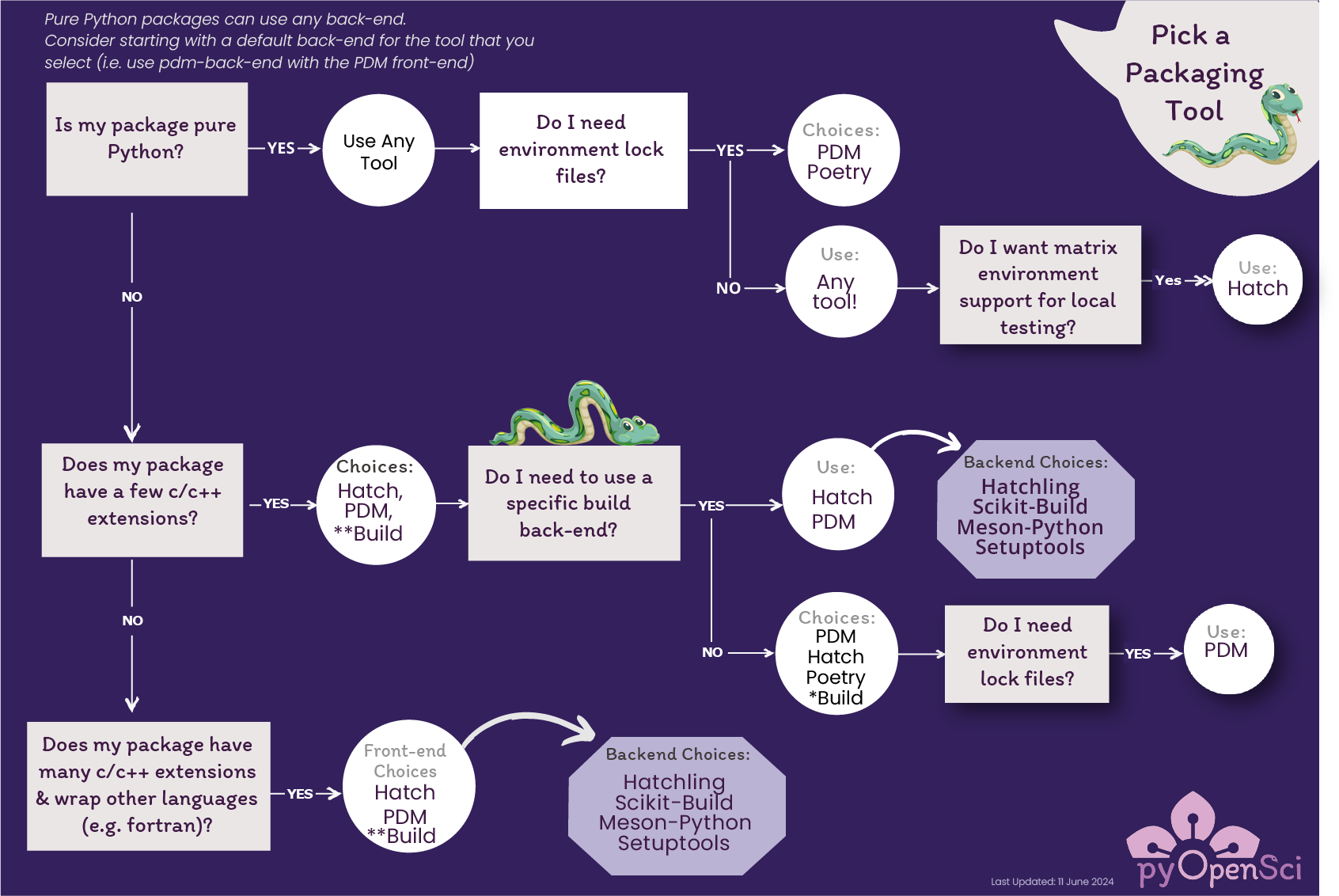
このディシジョン ツリーは、パッケージ化ツールの選択に役立ちます。詳細な比較と推奨事項については、パッケージング ツール ページ を参照してください。#
私たちの推奨事項#
私たちは、次の 3 つの原則に基づいてツールとアプローチを提案します。
初心者向け - パッケージングの初心者にとって学びやすく、使いやすいツール
よく管理されている - 活発な開発と充実したドキュメントを備えたツール
Standards-aligned - Tools that follow current Python packaging standards and Scientific Python community specs
Pure Python vs. complex builds#
純粋な Python パッケージ では、最新のツール (Hatch、PDM、Poetry、Flit) を使用できます - 必要な機能に基づいて選択してください
C/C++ 拡張機能を含むパッケージには、追加のビルド手順が必要な場合があります。ガイダンスについては、複雑なビルド ページ を参照してください。コンパイルされたプロジェクトのパッケージ化に関する包括的な情報については、コンパイルされたパッケージ化に関する Scientific Python 開発ガイド を参照してください。
ほとんどの科学的な Python パッケージは単純なものから始まり、必要に応じてより複雑な要件を処理できるように進化できます。
ピアレビューのためにパッケージを送信しますか?#
If you're planning to submit your package to pyOpenSci for peer review, check out our editor checklist for the minimum requirements. These checks are useful for anyone creating a Python package, not just those submitting for review.
これらは推奨事項であり、要件ではありません
このガイドの提案は、適切に構造化されたパッケージを作成するのに役立つように設計されています。これらは、pyOpenSci ピアレビューの特定の要件ではありません**。
If you're submitting to pyOpenSci, see our package scope and author guide for actual review requirements.