clean-hugo theme: blog formatting and shortcode reference
Jan 1, 2019 • Community
A living reference for every shortcode and formatting option available in the clean-hugo theme — figures, admonitions, admonition quotes, blockquotes, pull quotes, feature quotes, buttons, YouTube embeds, and more.
This post is a living reference for the clean-hugo theme. Every shortcode and content-formatting option available in the theme is demonstrated here with a working example and the code that produces it. Use this post to test that a theme change has not broken existing content, and as a copy-paste resource when writing new blog posts.
Figures
The figure shortcode renders images with optional captions and
automatic WebP support. It generates a <picture> element with a WebP
<source> and a fallback <img>. If a .webp file exists alongside the
source image, modern browsers use it automatically.
Usage:
{{< figure
  src="images/pyopensci-general/pyopensci-timeline2019-2024.png"
  alt="Descriptive alt text."
  caption="Optional caption with **Markdown** support."
  link="images/pyopensci-general/pyopensci-timeline2019-2024.png"
>}}
Rendered:
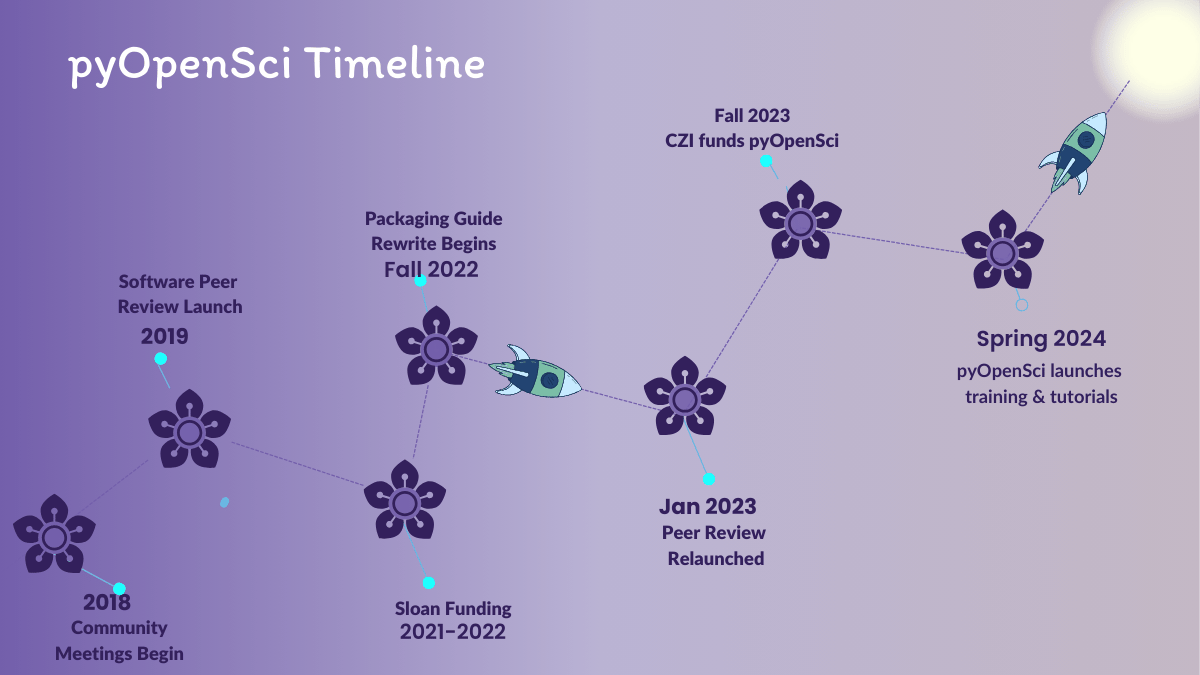
link param makes the image click-to-enlarge.Parameters:
| Param | Required | Description |
|---|---|---|
src | yes | Image path (static or page bundle) |
alt | yes | Alt text — always required for accessibility |
caption | no | Caption text, supports Markdown |
link | no | URL the image links to (defaults to src) |
Admonitions
The admonition shortcode creates highlighted callout boxes. Five types
are available. An optional title param adds a heading inside the box.
Usage:
{{< admonition type="info" title="Optional title" >}}
Content with **Markdown** support.
{{< /admonition >}}
All five types rendered:
Rendered:
type="note" for general supplementary information. This is the
default type if you omit the type param.type="info" for helpful context or background detail that readers
may want but don’t strictly need.type="warning" to flag something that could cause problems if
overlooked — a deprecation, a known issue, a prerequisite.type="danger" for destructive or irreversible actions, or for
critical requirements that must be met before proceeding.type="success" to confirm a completed step, highlight a positive
outcome, or call attention to a best practice.Without a title:
title param and the header row is hidden entirely.Admonition quotes
The admonition-quote shortcode renders a quotation inside an
admonition-style callout box. It uses the same type variants as
admonition, with a single opening quote mark at the top (no closing
quote). Optional title, author, and event params are supported.
Same quote text in each example so you can compare styles.
Note:
{{< admonition-quote type="note" title="Note quote" author="Anonymous" event="AGU 2019 Townhall" >}}
Good research software is built for the people who use it.
{{< /admonition-quote >}}
Rendered:
Info:
{{< admonition-quote type="info" >}}
Good research software is built for the people who use it.
{{< /admonition-quote >}}
Rendered:
Warning:
{{< admonition-quote type="warning" title="A community reminder" >}}
Good research software is built for the people who use it.
{{< /admonition-quote >}}
Rendered:
Success:
{{< admonition-quote type="success" author="pyOpenSci community member" >}}
Good research software is built for the people who use it.
{{< /admonition-quote >}}
Rendered:
Danger:
{{< admonition-quote type="danger" >}}
Good research software is built for the people who use it.
{{< /admonition-quote >}}
Rendered:
Parameters:
| Param | Default | Description |
|---|---|---|
type | note | Admonition variant: note, info, warning, danger, success |
title | — | Optional heading above the quote |
author | — | Attribution name (optional) |
event | — | Event or source (optional) |
Blockquotes
Plain Markdown blockquotes are for inline citations in the flow of a post — a left border, light background, and Lora italic body text. No shortcode is required.
Use a pull quote when you want the same quote typography with a decorative opening mark and no sidebar box. Use a feature quote for compact sidebar-style quotes (home page project block, two-column layouts). Use an admonition quote when the quote should sit inside a colored callout box.
Single paragraph:
> Good research software is built for the people who use it.
Good research software is built for the people who use it.
With attribution (written in Markdown):
> Good research software is built for the people who use it.
>
> — **pyOpenSci community member**, *Peer review guide*
Good research software is built for the people who use it.
— pyOpenSci community member, Peer review guide
Multi-line quote:
> Good research software is built for the people who use it.
>
> Quotes can span multiple paragraphs when you need more room.
Good research software is built for the people who use it.
Quotes can span multiple paragraphs when you need more room.
Nested in a list (blockquote inside list item):
* Before you submit, read the packaging guide.
* Remember the goal of review:

  > Good research software is built for the people who use it.

* Then open your submission issue on GitHub.
Before you submit, read the packaging guide.
Remember the goal of review:
Good research software is built for the people who use it.
Then open your submission issue on GitHub.
Pull quotes
The pullquote shortcode uses the same Lora quote text as blockquotes,
with a decorative opening mark above and no left border or background.
Three accent colors are available for the mark. Optional author and
event params add attribution.
Same quote text in each example so you can compare colors.
Teal (default):
{{< pullquote color="teal" author="Anonymous" event="AGU 2019 Townhall" >}}
Good research software is built for the people who use it.
{{< /pullquote >}}
Rendered:
Good research software is built for the people who use it.
Magenta:
{{< pullquote color="magenta" >}}
Good research software is built for the people who use it.
{{< /pullquote >}}
Rendered:
Good research software is built for the people who use it.
Purple:
{{< pullquote color="purple" author="pyOpenSci community member" >}}
Good research software is built for the people who use it.
{{< /pullquote >}}
Rendered:
Good research software is built for the people who use it.
Parameters:
| Param | Default | Description |
|---|---|---|
color | teal | Color variant: teal, magenta, or purple |
author | — | Attribution name (optional) |
event | — | Event or source (optional, requires author) |
Feature quotes
The feature-quote shortcode renders a compact quote with a Font Awesome
opening mark and Nunito Sans italic text at 1.3rem — no left border or gray
background. This is the same style used in the home page Current project
block. Three accent colors match the pull quote palette.
Purple (default):
{{< feature-quote cite="Eliot Robson" >}}
Gen AI solutions remind us that the centerpiece of open-source software is
building a community around solving a specific problem.
{{< /feature-quote >}}
Rendered:
Gen AI solutions remind us that the centerpiece of open-source software is building a community around solving a specific problem.
Teal:
{{< feature-quote color="teal" cite="Anonymous" >}}
Good research software is built for the people who use it.
{{< /feature-quote >}}
Rendered:
Good research software is built for the people who use it.
Magenta:
{{< feature-quote color="magenta" >}}
Good research software is built for the people who use it.
{{< /feature-quote >}}
Rendered:
Good research software is built for the people who use it.
Parameters:
| Param | Default | Description |
|---|---|---|
color | purple | Accent for the mark and quote text: purple, teal, or magenta |
cite | — | Attribution name (optional) |
author | — | Alias for cite |
Buttons
The button shortcode renders a styled CTA link. Variants use pyOpenSci
brand colors. Default and large (size="lg") sizes are supported.
Dark purple:
{{< button href="/blog/" variant="dark-purple" >}}
Dark purple
{{< /button >}}
Rendered:
Dark purpleWhite:
{{< button href="/blog/" variant="white" >}}
White
{{< /button >}}
Rendered:
WhiteGreen:
{{< button href="/blog/" variant="green" >}}
Green
{{< /button >}}
Rendered:
GreenLight purple:
{{< button href="/blog/" variant="light-purple" >}}
Light purple
{{< /button >}}
Rendered:
Light purpleOutline:
{{< button href="/blog/" variant="outline" >}}
Outline
{{< /button >}}
Rendered:
OutlineLarge:
{{< button href="/blog/" variant="dark-purple" size="lg" >}}
Large button
{{< /button >}}
Rendered:
Large buttonWith icon (right):
{{< button href="/blog/" variant="dark-purple" icon="arrow-right" iconPosition="right" >}}
Continue reading
{{< /button >}}
Rendered:
Continue readingWith icon (left):
{{< button href="https://github.com/pyOpenSci" variant="outline" icon="github" target="_blank" >}}
View on GitHub
{{< /button >}}
Rendered:
View on GitHubParameters:
| Param | Default | Description |
|---|---|---|
href | # | Link URL |
variant | dark-purple | dark-purple, white, green, light-purple, outline |
size | — | lg (optional) |
icon | — | Font Awesome icon name (without fa-) |
iconPosition | left | left or right |
target | — | _blank for external links |
YouTube
The youtube shortcode embeds a YouTube video in a responsive 16:9
container. Pass the video ID from the URL (the part after v=).
Usage:
{{< youtube id="n9IZGT4DxDs" >}}
Rendered:
Blog list
The blog-list shortcode pulls the most recent blog posts and renders
them as listing cards. Use it on any page to surface recent content.
Usage:
{{< blog-list title="Recent posts" limit=3 >}}
Rendered:
Recent posts
Hello from Shauna — joining pyOpenSci as Research and Community Lead
Meet Shauna Gordon-McKeon, our new Research and Community Lead! A longtime member of the Python and open science communities, she’ll support peer review and community operations alongside research on …
Read moreMaintain Python code quality in Quarto Markdown files using lintquarto
lintquarto is a package for running linters, formatters, static type checkers and code analysis tools on Python code in Quarto markdown (.qmd) files.
Read moreUN Open Source Week 2026: The Power of Connection
At UN Open Source Week in New York City, maintainers, policymakers, and community leaders wrestled with AI, digital sovereignty, and security — and kept coming back to the same truth. The tools we …
Read moreParameters:
| Param | Default | Description |
|---|---|---|
title | Recent Thoughts | Section heading |
limit | 3 | Number of posts to display |
Impact card grid
The impact-cards shortcode renders a responsive card grid from the page
cards: front matter. Card types include image highlights, white icon
cards, and large text_only headline cards. Set cards_layout: wide in
front matter for a three-column desktop grid.
Usage (front matter + shortcode):
cards:
  - text_only: true
    title: "Large text card"
  - modifier: "card--white"
    icon: "fa-solid fa-mobile-screen"
    title: "White card with icon"
    excerpt: "Icon, title, and body text."
  - title: "Teal highlight card"
    icon: "fa-solid fa-code"
    excerpt: "Default modifier uses primary-light background."
{{< impact-cards >}}
Rendered (uses the demo cards: on this page):
Large text card
White card with icon
Teal highlight card
Feature row
Side-by-side image and text with an optional button. Use on landing pages inside swoosh sections.
Usage:
{{< feature-row layout="left"
    title="Feature row title"
    image="/images/landing-pages/scipy-sprint-working.png"
    alt="Descriptive alt text."
    buttonUrl="/about-peer-review/"
    buttonLabel="Learn more" >}}
Markdown body copy with **formatting** support.
{{< /feature-row >}}
Rendered:

Feature row example
left,
right, or center.Swoosh section
Full-width band with optional curved dividers. When nesting other shortcodes inside, use Hugo’s HTML shortcode form (angle brackets), not the markdown shortcode form (percent signs).
Usage:
{{< section_band color="light-purple" divider="bottom" >}}
{{< section-heading title="Inside a swoosh" >}}
{{< /section_band >}}
Rendered:
Inside a swoosh section
Intro section
Renders intro_section.text from page front matter — typically placed
below a hero on splash pages.
Usage:
intro_section:
  text: "Lead paragraph shown in the intro band."
{{< intro-section >}}
Rendered:
Connect with pyOpenSci
Admonition-style callout with community links and social follow list.
Usage:
{{< connect-with-pyos >}}
Rendered:
There are many ways to get involved if you're interested!
- If you read through our lessons and want to suggest changes, open an issue in our lessons repository
- Volunteer to be a reviewer for pyOpenSci's software review process
- Submit a Python package to pyOpenSci for peer review
- Donate to pyOpenSci to support scholarships for future training events and the development of new learning content
- Check out our volunteer page for other ways to get involved
- Explore our Python Package Guide for comprehensive packaging guidance
- Keep an eye on our events page for upcoming training events
Follow us:
If you are on LinkedIn, check out and subscribe to our newsletter.
Recent contributors
Grid of the most recently added people from data/contributors.yml.
Usage:
{{< recent-contributors limit="2" >}}
Rendered:
pyOpenSci has a diverse and vibrant community of pythonistas! To date, 408 wonderful people have contributed to pyOpenSci.


Eric Chen
Recent packages
Grid of recently accepted packages from data/packages.yml.
Usage:
{{< recent-packages limit="2" >}}
Rendered:
Recently accepted Python packages
solar-wavelength-calibration
Library for computing absolute wavelength calibration of Solar spectra.

MILESpy
Python wrapper for the MILES stellar library and Single Stellar Population models

Upcoming events
Event cards from content/events/ (upcoming dates only).
Usage:
{{< upcoming-events limit="2" >}}
Rendered:
Training feature
Home-page training strip — reads training_feature from page front matter.
Usage:
training_feature:
  eyebrow: "Training"
  badge: "New cohort"
  title: "Course title"
  excerpt: "Short description."
  button_label: "Learn more"
  button_url: "/events/"
  image:
    src: "images/landing-pages/scipy-sprint-2026.png"
    alt: "Alt text."
{{< training-feature >}}
Rendered:

Current project
Full-width quote band used on the home page — reads current_project from
front matter.
Usage:
current_project:
  eyebrow: "Current project"
  title: "Headline"
  excerpt: "Supporting text."
  quote: "Quote text."
  cite: "Attribution"
  button_label: "Get involved"
  button_url: "/events/"
{{< current-project >}}
Rendered:
Demo
Current project band
Good research software is built for the people who use it.
Editorial board
People grids for editorial board and emeritus editors from
data/contributors.yml. Used on program landing pages.
Usage:
{{< editorial-board >}}
Rendered:
Meet our editorial board
The pyOpenSci software peer review process is led by a volunteer team of editors from the scientific Python community. Editors do the following things:
- They find reviewers from diverse backgrounds who have a mixture of scientific domain and Python experience.
- They oversee the entire review process for a package ensuring it runs in a timely and efficient manner.
- They support the submitting authors and reviewers in answering questions related to the review.
- They determine whether that package should be accepted into the pyOpenSci ecosystem once the review has wrapped up.
Learn more about the editor role at pyOpenSci in our peer review guide.

Shauna Gordon-McKeon
@shrishar
Profile missing from contributors.yml

Carter Lee Rhea

Kylen Solvik

Akrita

James J Balamuta


Julieta Millan


Sebastian Lobentanzer


Lauren Yee
Emeritus editors
We are deeply grateful for those who served on our editorial board previously.
Landing-page shortcodes (reference only)
These shortcodes are used on specific splash pages and require matching front matter or site data. They are listed here for completeness; see CONTRIBUTING.md for layout details.
| Shortcode | Typical page | Notes |
|---|---|---|
home-programs-full | Home | Wraps impact-cards with section heading |
partnership-cards | Partners | Reads partnership_cards from front matter |
partnership_table | Ways to give | Styled sponsorship tier comparison table |
university-testimonials | Learn — universities | Testimonial carousel |
university-benefits-list | Learn — universities | Benefits list partial |
packaging-guide-grid | Python packaging resources | Static guide links grid |
tutorial-grid | Python packaging resources | Tutorial cards grid |
Section heading
The section-heading shortcode renders a large centred heading with an
optional subtitle. Useful at the top of long posts to establish visual
hierarchy.
Usage:
{{< section-heading
  title="Section title"
  subtitle="Optional subtitle • With separators"
>}}
Rendered:
Section heading example
Metrics bar
The metrics-bar shortcode renders a row of key statistics with large
numbers. Use it to highlight impact data.
Named presets (live data from site YAML):
{{< metrics-bar set="volunteer" >}}
{{< metrics-bar set="packages" >}}
Or set metrics_set: volunteer in page front matter and call
{{< metrics-bar >}}. Presets live in
layouts/partials/metrics/presets/.
Manual stats (static or demo content):
{{< metrics-bar
  stat1="**128** blog posts"
  stat2="**500+** community members"
  stat3="**100+** reviewed packages"
  stat4="**WCAG AA** accessible"
>}}
Rendered (manual example):
Cards
Three card shortcodes are available for structured content blocks.
Two-card row
Usage:
{{< two-card-row >}}
{{< card title="Card one" icon="fa-solid fa-star" >}}
Content for the first card with **Markdown** support.
{{< /card >}}
{{< card title="Card two" icon="fa-solid fa-bolt" >}}
Content for the second card.
{{< /card >}}
{{< /two-card-row >}}
Rendered:
Peer review
Packaging guidance
Single card wide
Usage:
{{< single-card-wide title="Wide card" icon="fa-solid fa-users" >}}
Full-width card content here.
{{< /single-card-wide >}}
Rendered:
Join the pyOpenSci community
Standard Markdown elements
These are not shortcodes — they are standard Markdown rendered by Hugo. Include them here so a full blog post render covers all common content types.
Code blocks
Inline: python3 -m pip install pyopensci
Fenced block with syntax highlighting:
import pyopensci

# Submit a package for review
package = pyopensci.Package(
    name="mypackage",
    version="1.0.0",
    github_url="https://github.com/example/mypackage",
)
package.submit()
hugo serve --buildDrafts --disableFastRender
Blockquotes
See Blockquotes above for full examples. Quick render check:
> Good research software is built for the people who use it.
Good research software is built for the people who use it.
Tables
Default Markdown tables render with basic styling. For sponsorship tier
tables (and similar comparison layouts), use the partnership_table shortcode
so the table matches the live site: light purple header row, horizontal row
dividers, and bold purple tier names in the first column.
{{< partnership_table >}}
| Tier | Example focus | Example visibility & benefits |
| --- | --- | --- |
| **Ecosystem catalyst** | Companies ready to lead in supporting open source research software | Premier placement across channels; tailored activations such as mentored sprints and dedicated office hours |
| **Momentum driver** | Teams growing their scientific Python footprint | Sustained visibility on the website and in mailings; alignment with webinars and community programs |
| **Foundation builder** | Organizations beginning to invest in open science education | Recognition alongside training materials; support for scholarships and learner access |
{{< /partnership_table >}}
Rendered:
| Tier | Example focus | Example visibility & benefits |
|---|---|---|
| Ecosystem catalyst | Companies ready to lead in supporting open source research software | Premier placement across channels; tailored activations such as mentored sprints and dedicated office hours |
| Momentum driver | Teams growing their scientific Python footprint | Sustained visibility on the website and in mailings; alignment with webinars and community programs |
| Foundation builder | Organizations beginning to invest in open science education | Recognition alongside training materials; support for scholarships and learner access |
Plain table (no wrapper):
| Column A | Column B | Column C |
|---|---|---|
| Value 1 | Value 2 | Value 3 |
| Value 4 | Value 5 | Value 6 |
Lists
Unordered:
- First item
- Second item
- Nested item
- Another nested item
- Third item
Ordered:
- Step one
- Step two
- Step three
Blog post front matter reference
To create a new blog post, you can use the Hugo archetype instead of copying an existing post by hand:
hugo new content blog/your-post-slug.md
This creates a new file at content/blog/your-post-slug.md with all
of the front matter fields below pre-filled — see
themes/clean-hugo/archetypes/blog.md in the repo for the template
it’s based on.
Every blog post lives in content/blog/ and starts with a YAML front
matter block between two --- lines. Below is every field the theme
supports, with a comment above each one explaining what it does and
whether it’s required. Remove the comment lines from your own front
matter when you add a new post.
---
# Required. Page title. Rendered as the H1 in the hero, on blog cards,
# and in the browser tab / search results.
title: "Example blog post title"

# Required. Publish date (YYYY-MM-DD). Controls sort order on the blog
# index and the date shown in the hero and on cards.
date: '2026-01-01'

# Required. Must be "blog" so Hugo renders this page with the blog
# single-post layout and includes it in blog index listings.
type: blog

# Required. Permalink for this post, set explicitly so URLs match our
# historical Jekyll URLs rather than an auto-generated slug.
url: "/blog/example-post-slug.html"

# Required. Short 1-3 sentence summary. Used as the lead paragraph under
# the hero and as the excerpt shown on blog cards on the index page.
excerpt: A short summary of the post.

# Required. Author name. Shown in the hero meta line and used for SEO /
# structured data (article:author, BlogPosting JSON-LD).
author: Jane Doe

# Required. Topic badge and index filter category. Must match a key
# defined in data/blog_topics.yml: community | learn | software | updates
blog_topic: community

# Optional. Shows a sticky "On this page" table of contents built from
# the post's headings. Omit or set to false to hide it.
toc: true

# Optional. Date the post content was last substantively updated. Powers
# the "Last modified" note in the post footer and the SEO
# article:modified_time tag. Update this whenever you edit an
# already-published post.
lastmod: '2026-01-02'

# Optional. Hero and card image. Omit entirely for a plain gradient
# hero. Posts published before 2025-01-01 without an image are filed
# into the blog archives section instead of the main grid.
image:
  # Path to the image, relative to the images directory.
  src: images/headers/example-header.png
  # Accessible alt text describing what the image shows (see the
  # photography guidelines — not just the subject's placement).
  alt: Descriptive alt text for the header image.
  # Optional photo credit line shown near the hero image.
  credit: Photo by Jane Doe

# Optional. Tag links shown in the post footer, and used for SEO
# keywords. No current post sets this.
tags: ["packaging", "community"]

# Optional. Alternate source for the hero gradient color, and the SEO
# article:section value. No current post sets this.
category: "Open Education"

# Optional. Shows the author name on blog index cards (off by default).
show_author: true

# Optional. "Learn more" box rendered after the post content, linking to
# related pages.
learn_more:
  - title: "Packaging guide"
    url: "/packaging-guide/"
    icon: "fa-solid fa-book"
---
A couple of things worth knowing:
blog_topicis a custom parameter backed bydata/blog_topics.yml, not a Hugo taxonomy — the four valid values arecommunity,learn,software, andupdates.excerpt(the on-page lead text) anddescription(the SEO/Open Graph description) are separate fields. Most posts only setexcerpt, so their social previews fall back to an auto-generated summary.
Fully completed example
Here’s a real, published post’s front matter (“Meet Mandy Moore, pyOpenSci’s new Communications and Community Lead!”) with the rarely-used fields from above added in, so you can see every field filled out at once, with no comments:
---
title: Meet Juno Dog, pyOpenSci's new Community Lead!
date: '2025-08-13'
type: blog
excerpt: Meet Juno, our new Communications and Community Lead! Juno brings
  15+ years of experience in sniffing, barking and eating as many treats as possible.
  Learn more about her here.
author: Juno Dog
blog_topic: community
show_author: true
category: "Community"
tags: ["community", "team"]
toc: true
comments: true
url: "/blog/juno-communications.html"
lastmod: '2025-08-12'
image:
  src: images/headers/pyopensci-floral.png
  alt: Decorative pyOpenSci header with purple botanical artwork and a small Python label
  credit: pyOpenSci
learn_more:
  - title: "Get involved with pyOpenSci"
    url: "/get-involved/"
    icon: "fa-solid fa-people-group"
---
Keep reading
Hello from Shauna — joining pyOpenSci as Research and Community Lead
Meet Shauna Gordon-McKeon, our new Research and Community Lead! A longtime member of the Python and open science communities, she’ll support peer review and community operations alongside research on …
Read moreUN Open Source Week 2026: The Power of Connection
At UN Open Source Week in New York City, maintainers, policymakers, and community leaders wrestled with AI, digital sovereignty, and security — and kept coming back to the same truth. The tools we …
Read moreGenerative AI and open source: what PyCon US 2026 taught us about the path forward
Generative AI was a dominant theme at PyCon US 2026 — not as a buzzword, but as a lived reality the Python community is actively wrestling with. From our pyOpenSci open space to the Maintainers Summit …
Read more